
Lappu AI Journal
Anatomy of a Small Business WordPress Compromise
A real incident response investigation into a compromised small business WordPress site, including visitor-facing social engineering, injected theme code, suspicious plugin-like persistence, session evidence, containment, and practical remediation lessons.

Anatomy of a Small Business WordPress Compromise
How a visitor-facing attack led to a deeper forensic investigation
A compromised website is not just a technical problem or an operational inconvenience. For a business, it can become a direct financial risk.
When a trusted website is used to deliver malware, social engineering prompts, credential theft, or malicious payloads to visitors, the damage can extend well beyond the cost of cleanup. The business may face lost revenue, customer trust erosion, reputational harm, incident response costs, legal exposure, and potential liability if customers, employees, or partners are affected.
That is the larger risk this investigation highlights.
In this case, we were asked to look at suspicious behavior on a small business WordPress site. What initially looked like an odd page artifact quickly turned into a multi-layered compromise involving injected WordPress files, suspicious plugin-like persistence, visitor-facing social engineering, clipboard manipulation, and a Windows-specific PowerShell payload chain.
We are intentionally not naming the business, the domain, the hosting provider, users, IP addresses, email addresses, or any other customer-identifying details. The goal of this write-up is to show the investigation methodology, the evidence trail, and the lessons that other small businesses can apply.
Executive summary
During the investigation, we confirmed that the website was actively serving malicious behavior to visitors. The observed attack attempted to copy a command into the visitor’s clipboard and persuade the visitor to execute it on a Windows machine. This is consistent with the broader class of “ClickFix” style attacks, where the victim is socially engineered into running a malicious command themselves.
The compromise was not limited to a single suspicious web page. We found evidence across multiple layers:
- Malicious behavior visible from the public website
- Injected JavaScript and obfuscated browser-side logic
- Suspicious references to remote payload delivery infrastructure
- Malicious code added to multiple WordPress
functions.phpfiles - Suspicious plugin-like directories under
wp-content/plugins - Recent authenticated WordPress user sessions
- File timeline anomalies, including evidence consistent with timestamp preservation or timestamp manipulation
The most important conclusion was practical: once a WordPress site has been compromised for an extended period, cleanup alone may not be enough. In this case, the safest remediation path was to take the site offline temporarily, preserve evidence, remove known malicious artifacts, rotate credentials, and ultimately rebuild the WordPress installation from a clean baseline.
Discovery: the first visible sign
The investigation began when suspicious-looking text appeared on the website’s home page. That alone does not prove compromise. Websites can show odd text for many reasons: broken templates, plugin errors, failed embeds, advertising scripts, or accidental content changes.
But further investigation showed something more serious. When the site was visited, it attempted to place a command into the visitor’s clipboard and then guide the visitor into executing that command. The command was Windows-specific and used PowerShell. On non-Windows devices, including mobile and iOS devices, this behavior was not observed. That selectivity mattered. It suggested that the malicious logic was not simply breaking the website for everyone. It was attempting to identify a suitable victim environment and then present the appropriate attack path.
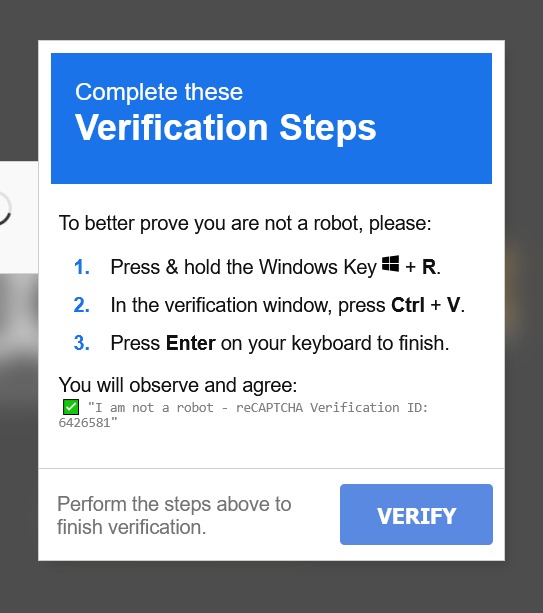
This shifted the investigation from “website cleanup” to incident response.
The priority became containment: prevent the site from harming visitors while preserving enough evidence to understand what happened.
Immediate containment
The first response was to temporarily disable the public website by replacing the site entry point with a maintenance page. This was done to prevent further harm.
When a compromised website is actively interacting with visitors, containment needs to happen quickly. Every additional page load can become another opportunity for a visitor to be manipulated into running code on their own machine.
The public facing response was intentionally neutral. No customer name, attacker attribution, infrastructure detail, or speculative statement was placed on the temporary page. The purpose was simple: stop the active visitor-facing attack while the investigation continued.
A clean timeline before cleanup
A common mistake during website incident response is to start deleting suspicious files immediately. That may make the site look cleaner, but it can destroy the evidence needed to understand the scope of compromise.
Before deeper cleanup, we preserved the WordPress file system and database. We also generated file timelines and retained metadata where possible. This allowed us to sort files by modification time, compare suspicious directories, and identify clusters of activity.
A simplified timeline looked like this:
| Date / Time | Event | Evidence | Interpretation |
|---|---|---|---|
| June 18, 2026, evening | Website visited | Clipboard hijack / social-engineering behavior observed | Site was actively serving malicious behavior |
| June 19, 2026, early morning | Full site backup preserved | WordPress files and database copied | Evidence preservation before cleanup |
| June 19, 2026, early morning | wp-config.php inspected |
Malicious snippets removed; follow-up search and clean | Possible injected loader or persistence mechanism |
| June 19, 2026, morning | Theme functions.php files inspected and cleaned |
Multiple theme files contained injected code | Theme-level persistence |
| June 19, 2026, morning | Suspicious plugin directories identified | wp-helper-a2e475, wp-helper-d54862 |
Likely malicious plugin-style persistence |
| June 19, 2026, morning | WordPress database checked | No active plugins listed in active_plugins |
Filesystem artifacts existed outside the normal active-plugin registry |
| June 19, 2026, morning | User sessions inspected | Recent admin/user sessions with IP, user agent, and timestamps | Evidence of authenticated access, but not proof of malicious action |
| June 19, 2026, morning | User sessions inspected | Recent admin/user sessions with IP, user agent, and timestamps | Evidence of compromised authenticated access |
| June 19, 2026, morning | Clean up | All discovered malicious artifacts cleaned | Public facing website restored to clean state of existing artifacts |
The timeline helped separate confirmed facts from hypotheses. That distinction is important. In incident response, being precise about what you know and what you do not know is critical in arriving at accurate conclusions.
The visitor-facing attack chain
The public website of a reputed business was attempting to execute a visitor-facing social engineering attack.
The pattern was straightforward but dangerous (ClickFix):
- A visitor landed on the compromised website.
- The page presented harmless seeming content or instructions.
- The page copied a command into the visitor’s clipboard.
- The visitor was guided to execute the command.
- On Windows, the command fetched and execute remote code.
The website compromise was not merely about the website. The attacker’s goal appeared to extend beyond controlling the WordPress site. The site was being used as a staging point to stage further attacks. We were one link in a potentially larger chain.
That is one reason this type of incident deserves more attention from small businesses. A compromised website can become a trust bridge. Visitors who would never intentionally download a suspicious executable may still follow instructions from a familiar business website, especially if the page presents the instructions as a verification step, browser fix, CAPTCHA, or a technical requirement.
Initial indicators
Several indicators stood out during the first pass.
We observed suspicious JavaScript patterns, including encoded content and browser-side execution behavior. We also observed references to remote infrastructure, including:
hxxps://cdn[.]jsdelivr[.]net/gh/arinao7/6e91d58f-acdf/key
hxxps://bsc-testnet-rpc[.]publicnode[.]com/
The jsDelivr/GitHub URL are in public threat intelligence as an indicator of compromise. ThreatFox lists this specific URL as IOC 1833840: ThreatFox IOC 1833840. The GitHub-hosted content has been taken down and is no longer available, but it had already been captured as part of the evidence trail.
The attack behavior also matched the broader “ClickFix” pattern documented by Proofpoint, where users are tricked into copying, pasting, and executing PowerShell or command-line content themselves:
- Proofpoint: From Clipboard to Compromise: A PowerShell Self-Pwn
- Proofpoint: Security Brief: ClickFix Social Engineering Technique Floods Threat Landscape
The blockchain RPC reference was also notable. The browser-side logic made calls to a BSC Testnet RPC endpoint, retrieved a hex-encoded response, extracted a string, decoded content, and executed it in the browser context.
That is a clever payload-delivery pattern. Instead of hosting the final script in an obvious web location, the attacker used a blockchain RPC call as a second-stage delivery mechanism. This can make static detection and takedown harder, because the visible web page does not contain the final payload directly.
Filesystem investigation
The filesystem review focused on three questions:
- What changed recently?
- What files contained suspicious code?
- What artifacts could provide persistence?
The investigation found two suspicious plugin-like directories:
wp-content/plugins/wp-helper-a2e475
wp-content/plugins/wp-helper-d54862
Each contained a small PHP file and a cache directory. The naming pattern looked intentionally generic, as if designed to blend into a WordPress environment without attracting attention.
A key finding was that these directories did not need to be active WordPress plugins in the normal sense to be relevant. A directory under wp-content/plugins can still contain PHP code, web-accessible files, loaders, or helper scripts, even if WordPress does not show it as an active plugin in the admin interface.
That is why filesystem inspection matters. Looking only at the WordPress admin panel can miss artifacts that exist on disk.
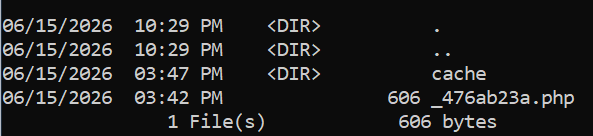
We also reviewed theme files and found malicious code injected into multiple functions.php files across the active theme and several installed themes.
That pattern is common in WordPress compromises. The functions.php file is attractive to attackers because it is loaded by WordPress as part of normal theme execution. If malicious code is added there, it can run without requiring a visible plugin activation.
Quarantined or infected files
Where original malicious or infected file content was preserved, files were hashed before deletion or quarantine. The hashes and exact paths were retained as internal investigation artifacts, but they are intentionally not published here because they can expose customer-specific operational details and are not reliable as a universal indicator set.
Injected WordPress backdoor behavior
One of the injected snippets created a backdoor-style login path.
The sanitized behavior was:
On WordPress init:
  If a specific query parameter is present:
    If the visitor is not already logged in:
      Locate an administrator account
      If no administrator is found, locate an editor account
      Set an authentication cookie for that user
      Redirect to the WordPress admin area
    Else:
      Redirect to the WordPress admin area
We are intentionally not publishing the complete runnable code. The important point is what the code did.
It allowed someone who knew the trigger parameter to obtain an authenticated WordPress session as an existing privileged user, without knowing that user’s password.
That finding changed the interpretation of the incident. The attacker did not merely inject JavaScript into a page. They also had a server-side persistence mechanism that could allow re-entry into WordPress administration.
Backup comparison and timestamp anomalies
A backup from May 30, 2026 was available for comparison.
That backup became important because one of the infected theme files in the June 18 copy did not contain the same injected backdoor code in the May 30 backup. This allowed us to narrow the injection window for that specific file: the backdoor was added sometime between the May 30 backup and the June 18 copy.
However, the file modification timestamp shown in both copies was much older.
That discrepancy is significant. It suggests one of two possibilities:
- The file was modified in a way that preserved the original timestamp.
- The timestamp was intentionally manipulated after modification.
In either case, it is a reminder not to rely on file modification times alone. File timestamps are useful evidence, but they are not the same as proof. Comparing known-good backups against current files is often more reliable than looking at timestamps in isolation.
Database investigation
WP-CLI was not available in the hosting environment, so the database review was done directly through SQL queries and filesystem inspection.
The database review focused on:
- Administrator accounts
- User capabilities
- Active plugin state
- Recent session tokens
- Unexpected authenticated access
The active_plugins option did not show active plugins. That was useful, but it did not eliminate the plugin directories as suspicious. The malicious artifacts existed on disk regardless of whether WordPress considered them active plugins.
We also reviewed WordPress session tokens. These records showed recent authenticated sessions, including user, timestamp, IP address, and user agent details.
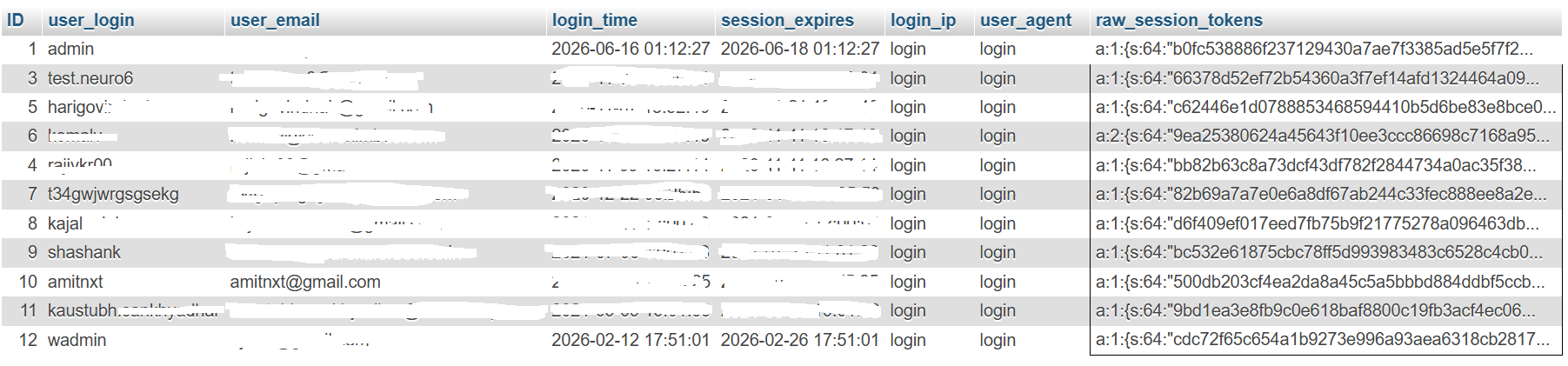
This evidence was important, but it required careful interpretation. A recent administrator session can show that an authenticated session existed. It does not, by itself, prove that the session made the malicious changes. It also does not prove whether the session came from stolen credentials, a backdoor, a reused password, a compromised device, or another path. In this case, the session evidence was consistent with the backdoor login path, but it was not enough on its own to prove the exact access sequence.
What we could prove
By the end of the investigation, we could prove several things with confidence.
- The website was serving malicious behavior to visitors.
- Multiple WordPress files contained injected code.
- Suspicious plugin-like persistence existed on disk.
- The malicious behavior included a Windows-specific PowerShell execution path.
- The browser-side logic included obfuscated or staged execution patterns, including the use of external infrastructure and a blockchain RPC endpoint.
- WordPress session records showed recent authenticated access.
- The injected code in at least one theme file was not present in the May 30 backup and was present in the June 18 copy.
Those findings were enough to justify aggressive remediation.
What we could not prove
Equally important, there were things we could not prove.
We could not determine the exact initial access vector.
We could not prove that a specific user session performed the malicious changes.
We could not reconstruct every request made by the attacker. The web server log files were deleted as part of the attack.
Some web server logs were unavailable or had been removed, limiting the ability to trace the full request path.
Some artifacts suggested the environment may have had suspicious file history going back much further than the visible June activity, but without complete historical logs and clean baselines, it would not be responsible to claim a precise compromise date for the entire environment.
This is often the reality of small business incident response. Investigators need to combine available evidence: file timelines, backups, database records, code review, known indicators, and observed behavior.
Remediation
The remediation plan had two phases: immediate risk reduction and long-term recovery.
Immediate steps included:
- Temporarily disabling public access
- Preserving a full backup of the WordPress file system and database
- Removing or quarantining suspicious plugin-like directories
- Cleaning injected
functions.phpfiles - Searching the codebase for known indicators
- Reviewing administrator accounts and removing unnecessary access
- Rotating database and resource passwords
- Checking for unexpected user sessions
Known suspicious files were hashed before deletion or quarantine where original content was available. This created a record that could be used for later comparison or threat intelligence correlation.
Longer-term remediation
This requires a more conservative conclusion: because the compromise has multiple layers and the full historical scope cannot not be proven, the safest path is to rebuild the WordPress installation from a clean baseline.
That means:
- Fresh WordPress core
- Fresh theme and plugin installation from trusted sources
- No reuse of questionable PHP files from the compromised environment
- Credential rotation
- Administrator review
- Removal of unused themes and plugins
- Ongoing monitoring
For a simple defacement, file cleanup may be enough. For a multi-layer compromise with server-side backdoor behavior and visitor-facing payload delivery, rebuilding is often the more responsible option. This is for the customer to follow through with their website developer.
Lessons for small businesses
1. A compromised website can attack your visitors
The most important lesson is that a website compromise is not just an internal business issue. If your site is trusted by customers, partners, or employees, attackers can exploit that trust. A visitor-facing attack can turn your website into a delivery vehicle for malware, credential theft, or social engineering.
2. “No active malicious plugin” does not mean “no malicious code”
WordPress admin screens are not a complete forensic view. A malicious directory under wp-content/plugins may not appear as an active plugin. Malicious code may live in theme files, uploads, cache directories, mu-plugins, configuration files, or web-accessible PHP files.
Filesystem inspection is essential.
3. Theme files are common persistence points
The functions.php file is a frequent target because it runs as part of normal WordPress execution. If multiple installed themes have modified functions.php files, that is a strong signal that the compromise may be broader than the currently active theme.
Unused themes should be removed, not merely ignored.
4. File timestamps are useful, but not definitive
File modification times can help build a timeline, but they can also mislead. Attackers may preserve timestamps, alter timestamps, or modify files in ways that do not produce the expected metadata.
Known-good backups are extremely valuable because they allow direct content comparison.
5. Session evidence needs careful interpretation
WordPress session tokens can show recent authenticated access, including login time, expiration time, IP address, and user agent. That is useful evidence. But session records do not automatically prove the root cause. They must be interpreted alongside filesystem evidence, logs, backups, and user/account review.
6. Backups are not just for recovery
Backups are also investigative evidence. In this case, a prior backup helped establish that a specific backdoor snippet was absent on May 30 and present by June 18. Without that backup, the timeline would have been much weaker.
7. Rebuild when scope is uncertain
There is a point where cleanup becomes less trustworthy than replacement. If a site contains multiple malicious artifacts, backdoor login behavior, visitor-facing payload delivery, unavailable logs, and questionable historical file changes, rebuilding from a clean baseline is often the safest path.
Practical checklist for WordPress site owners
Small businesses do not need to become forensic experts, but they should have basic controls in place.
Keep WordPress core, themes, and plugins updated. Remove unused themes and plugins.
Use strong, unique passwords and multi-factor authentication for administrator accounts.
Limit administrator access to people who truly need it.
Keep regular backups and periodically verify that they can be restored.
Do not assume that a clean-looking homepage means the site is clean.
Do not assume that a plugin must be “active” in WordPress to be dangerous.
And most importantly: if a website ever asks a visitor to open PowerShell, Terminal, Run, or a command prompt and paste a command, treat that as malicious.
Public references
The following external references provide broader context for the public threat patterns observed during the investigation:
- ThreatFox IOC 1833840:
hxxps://cdn[.]jsdelivr[.]net/gh/arinao7/6e91d58f-acdf/key - Proofpoint: From Clipboard to Compromise: A PowerShell Self-Pwn
- Proofpoint: Security Brief: ClickFix Social Engineering Technique Floods Threat Landscape
- KrebsOnSecurity: ClickFix: How to Infect Your PC in Three Easy Steps