
Lappu AI Journal
Hackers Abuse Microsoft Azure Monitor to Send "Legitimate" Scam Emails
Attackers are abusing Microsoft Azure Monitor alerts to send phishing emails from real Microsoft infrastructure, allowing the messages to pass SPF, DKIM, DMARC, and ARC while still carrying callback-phishing content.
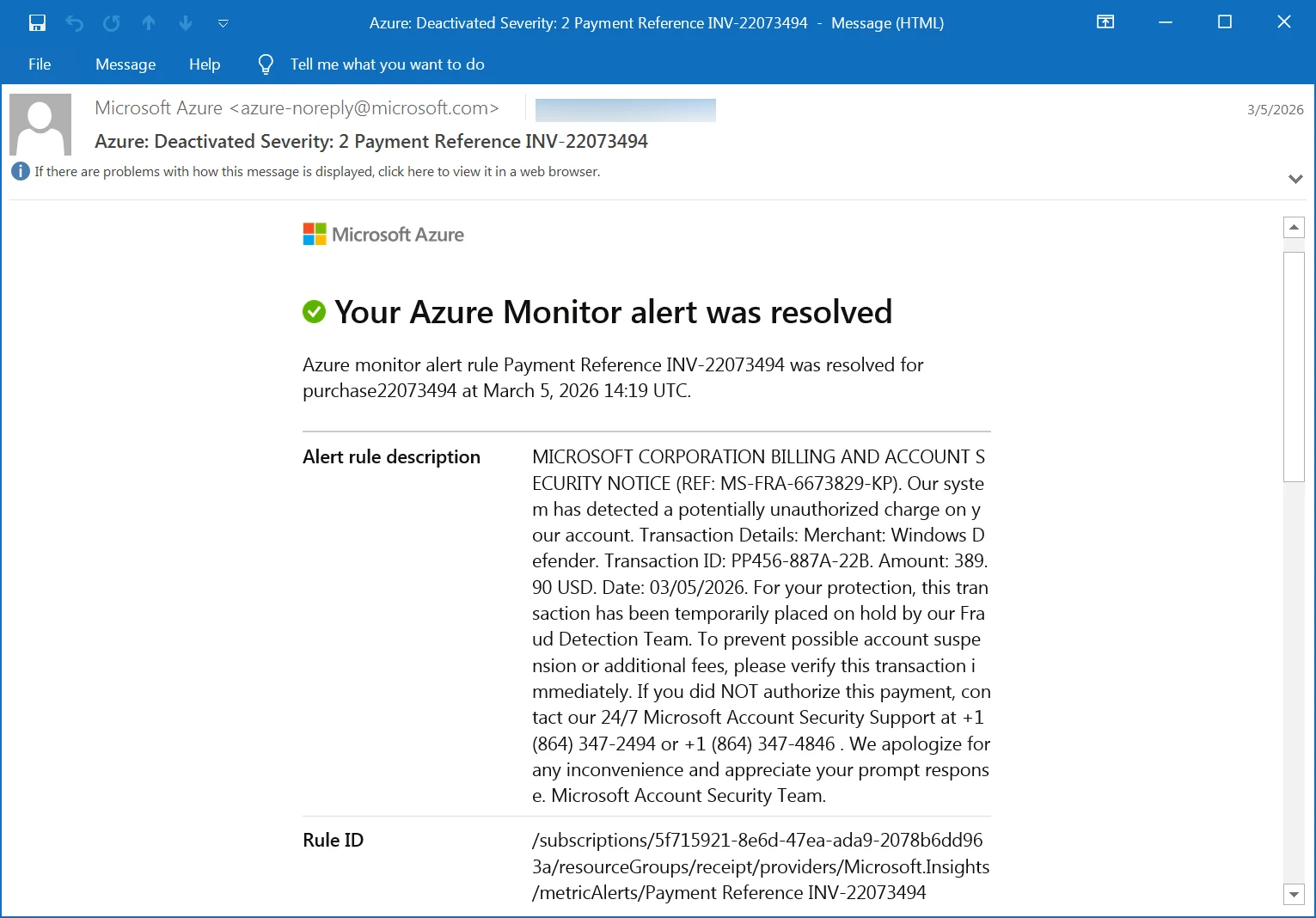
Hackers Abuse Microsoft Azure Monitor to Send “Legitimate” Scam Emails
Overview
A highly deceptive phishing campaign is targeting users by abusing Microsoft Azure Monitor alerts to deliver scam emails that appear completely legitimate.
Unlike traditional phishing attacks that rely on spoofed domains, these emails are sent directly from Microsoft infrastructure (azure-noreply@microsoft.com). This makes them significantly more dangerous — they pass standard email authentication checks and look trustworthy even to trained users.
What Is Azure Monitor (and Why It’s Being Exploited)
Azure Monitor is a legitimate Microsoft service used to:
- Track application and infrastructure performance
- Monitor billing and usage
- Trigger alerts based on system events
- Notify users via email, SMS, or webhooks
Attackers have discovered they can abuse the alert system’s “custom description” field to inject phishing content.
How the Attack Works
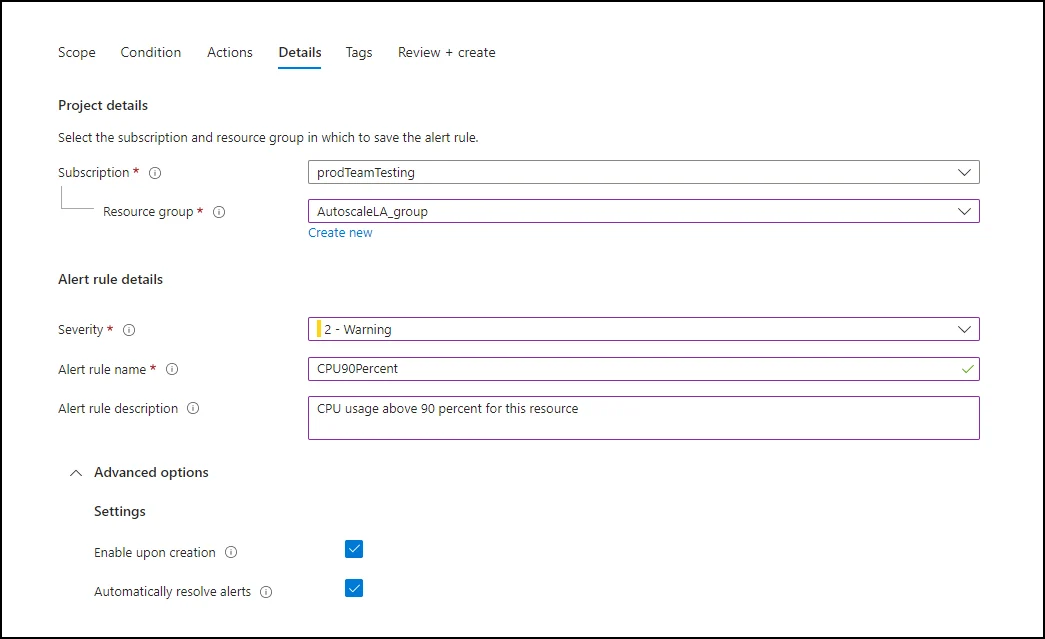
- Attacker creates an Azure account
- They configure an alert rule with a malicious message in the description field
- The alert is triggered (e.g., fake “invoice” or “payment” event)
- Azure sends a real email from Microsoft infrastructure
- The email is forwarded or distributed to targets
Because the email originates from Microsoft:
- SPF = pass
- DKIM = pass
- DMARC = pass
- ARC = pass
This makes the email extremely difficult to detect using traditional email security controls.
Example of the Phishing Message
MICROSOFT CORPORATION BILLING AND ACCOUNT SECURITY NOTICE
Our system has detected a potentially unauthorized charge on your account.Merchant: Windows Defender
Amount: $389.90 USDFor your protection, this transaction has been placed on hold.
If you did NOT authorize this payment, contact Microsoft Account Security Support immediately at:
+1 (864) 347-2494
Key Red Flags
- Phone number included (Microsoft rarely asks you to call random numbers)
- Urgency (“immediate action required”)
- Suspicious charge amount
- Generic “Microsoft Security Team” signature
Why This Attack Is So Effective
This campaign is particularly dangerous because it breaks common user assumptions:
1. It’s Not Spoofed
The email is genuinely sent from:
@microsoft.com- Microsoft’s own mail servers
2. It Passes All Authentication Checks
dkim=pass
spf=pass
dmarc=pass
arc=pass
Most email gateways (even advanced ones) treat this as trusted traffic.
3. It Uses Legitimate Infrastructure
This is an example of “platform abuse”, not traditional phishing.
Variants Seen in the Wild
Attackers are using different alert names to appear legitimate:
- “Invoice Paid INV-d39f76ef94”
- “Payment Reference INV-22073494”
- “Funds Successfully Received”
- “MemorySpike Alert”
- “DiskFull Warning”
These are designed to blend in with real operational or billing alerts.
What Happens If You Call the Number?
This is known as callback phishing.
While we did not engage with the attackers, similar campaigns typically lead to:
- Credential theft (Microsoft / Office 365 login)
- Payment fraud
- Installation of remote access tools (e.g., AnyDesk, TeamViewer)
- Initial access into corporate environments
Why DMARC Alone Is Not Enough
This attack is a perfect example of a growing category:
“Authenticated phishing”
Even with strict policies like:
p=reject- SPF/DKIM alignment
These emails still pass because they are legitimate messages carrying malicious content.
This is where content-level analysis and behavioral detection become critical.
How to Protect Yourself (and Your Organization)
For Individuals
- Never call phone numbers in unsolicited emails
- Verify billing alerts directly in your Azure/Microsoft account
- Treat urgency as a red flag
For Businesses
- Implement advanced email security beyond SPF/DKIM/DMARC
- Flag emails that:
- Contain phone numbers + urgency
- Mimic billing/security alerts
- Train employees on callback phishing techniques
- Monitor for:
- “Resolved alert” emails with unusual descriptions
- Unexpected Azure Monitor notifications
Lappu AI Perspective
At Lappu AI, we’re seeing newer advanced phishing techniques emerge:
Attackers are evolving using spoofing domains and abusing trusted platforms
This means:
- Authentication is no longer sufficient
- Trust must be evaluated at the message intent level
- Security tools must understand context, not just headers
Final Takeaway
If an email:
- Comes from a trusted sender
- Passes all authentication checks
- But asks you to call a number urgently
Assume compromise not legitimacy.